Google Search Console can now measure an Instagram, TikTok, X or YouTube account, not just a website. Google calls these platform properties. Once you link an account, Search Console shows how often its posts appear on Google Search, Discover and Google News, how many people click, and which searches brought them.
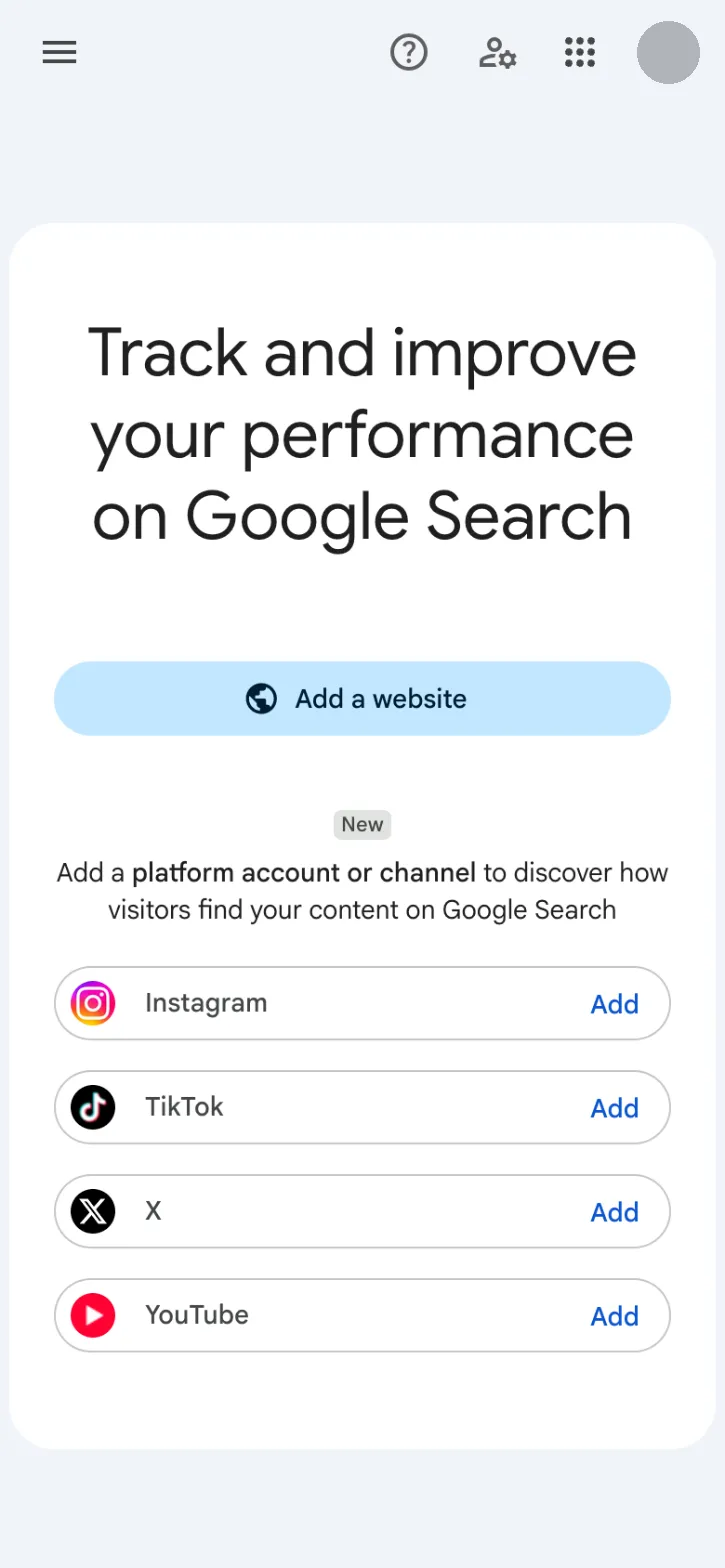
The feature was announced on 7 July 2026 by Moshe Samet, product manager lead for Search Console, and opened to everyone worldwide on 29 July. What has changed since is where Google puts it. When we opened Search Console on a phone on 23 November 2026, the welcome screen now offers the four platforms right under “Add a website”, with a “New” label above them.
 seogidi.com
Below is what the reports show, what Google appears to be testing, and the trade-offs we expect for businesses over the next few years.
What platform properties are
A platform property is a Search Console property for one social or video account. Each account or channel is its own property, so a business with an Instagram page and a YouTube channel adds two. The help page lists four supported platforms: Instagram, TikTok, X and YouTube.
You do not need a website. Google’s own announcement says the aim is to give “site owners and creators” a single view of how their content is found, including people with no site of their own. That is a first for a tool that has always started from a domain.
What the reports show
Each platform property gets the same three reports a website gets.
| Report | What it shows |
|---|---|
| Performance | Clicks, impressions, average click-through rate and average position, filterable by post and by search query |
| Insights | Recent traffic trends, top posts, and the groups of searches that bring people to your content, trending up or down |
| Achievements | Milestones, such as a new high for clicks from Google Search in the last 28 days |
The data covers Google Search, plus Discover and Google News when your content appears there. The help page is clear that platform properties “don’t track when people see your content on the platform itself.” A Reel’s views inside Instagram are not counted. A Reel shown on a Google results page is.
Some details are worth knowing before you read the numbers:
- Instagram stories count. Story impressions and clicks on Google are included.
- Video plays inside Google count as clicks. If someone taps a video and it opens in Google’s viewer, Search Console records a click, even though they never reached the platform.
- History starts on the day you connect. A new property only shows data from when collection began, and charts can stay empty for a few days.
- The default view is 28 days, the same as for websites.
Google’s follow-up guide suggests five uses: reading the search themes behind your traffic for “your next video topic, caption, or hashtag strategy”, a 24-hour filter for spotting a post that is taking off, exporting several properties into one spreadsheet, using annotations to track the effect of a changed title or caption, and comparing formats such as short videos against full-length ones.
How you connect an account
From the welcome screen, or from Add property in the property menu, you tap Add beside a platform and sign in to that account. We tried it with Instagram on mobile and stopped at the consent screen without connecting anything.
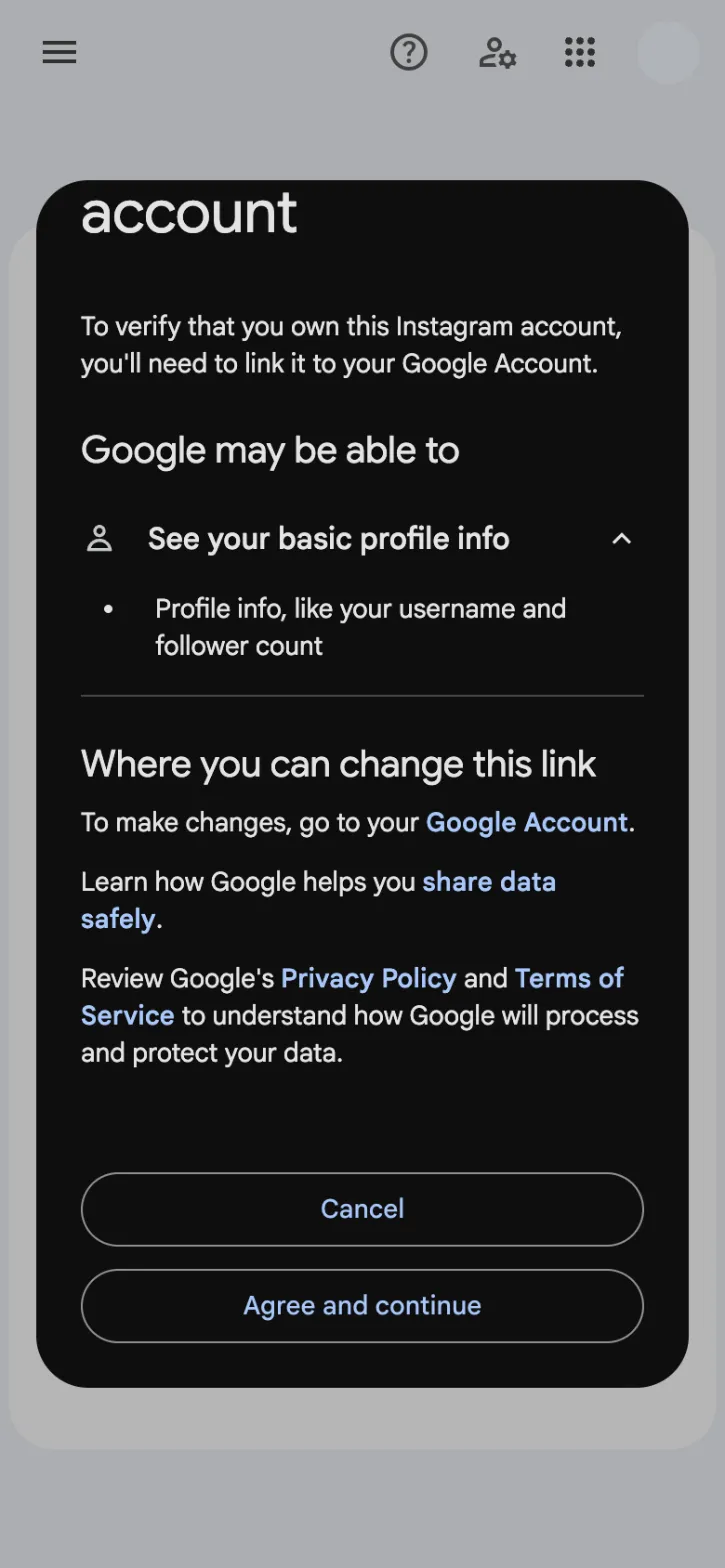
The screen says the link exists to prove ownership, and that Google “may be able to see your basic profile info”, which it describes as “your username and follower count”. You can remove the link later from your Google Account. The help page adds that Google checks ownership periodically. If the connection breaks, for example because a login expires, access to the reports pauses until you verify again, and your earlier data is still there when you do.
What Google is testing
Google has not published a strategy behind this, so what follows is our reading of the evidence. Three moves in twelve months point the same way.
Search is no longer only about websites. Google wrote, when the feature went global, that “publishers reach their audiences through a diverse range of channels beyond websites.” In December 2025 it tested showing social channel data inside Search Console for websites, and Search Engine Journal notes that platform properties followed that experiment. In June 2026 it launched Search profiles, profile pages that pull a creator’s or publisher’s short videos from Instagram, TikTok and YouTube into Google, starting in the US with accounts that already have a sizable following. Accounts verified through a claimed Search profile are added to Search Console automatically, according to the same Search Engine Journal report.
Google wants to be the place you measure this content. Each platform already has its own analytics. None of them can tell you how a post performs on Google. By offering that for free, and for accounts with no website, Google brings creators and small businesses into its own tools, where Discover follows and Search profiles also live.
The welcome screen is the test. For years, a new Search Console user had one choice: add a website. Today the platforms sit on the same first screen. That placement looks like Google measuring how many people without a website will sign up if invited. It is also how Google learns, with the owner’s permission, which Google Account belongs to which social account.
What it means for Nigerian businesses
Many Nigerian businesses sell through Instagram and WhatsApp before they ever build a website. Since 10 July 2025, public posts from Instagram professional accounts held by adults can appear in search engines, unless the owner turns off “Allow public photos and videos to appear in search engine results”. Platform properties give you a free way to see whether Google is actually sending people to those posts, and for which searches.
That is useful in two ways. A fashion seller in Lagos can see whether people find her Reels by searching for a product, a style or her brand name. And a business that is planning a website can use those searches to decide which pages to build first, because the demand is already proven. If you are building on TikTok, our guide to TikTok SEO covers how to make videos easier to find in the first place.
The pros and cons in the long run
The pros
- Free data you could not get before. Which posts Google shows, for which searches, and how often people click, with no paid tool.
- No website needed to start. A business that only has an Instagram page can now measure its search visibility.
- Better content decisions. The searches behind your posts tell you what people want, in their own words. That is useful for captions, video topics and, later, website pages.
- One language for SEO and social teams. Clicks, impressions and queries mean the same thing for the website and the channels.
- Proof of ownership. A verified link between your Google Account and your social accounts helps Google connect the pieces of your brand. Google has not said it affects rankings, so treat this as a likely side benefit, not a promise.
The cons
- It deepens dependence on rented platforms. Your Instagram audience belongs to Instagram. A rule change or a hacked account can wipe it out. A website is still the only channel you fully control, and the only place you own the checkout and the customer data.
- Half the picture. You see Google’s side only. Views inside the apps stay in each app’s own analytics, so you still need both.
- Social posts can compete with your own site. If Google is happy to show your Reel for a search, it may show it instead of your product page. That is fine when the Reel converts, and costly when the sale only happens on the site.
- More data shared. Linking gives Google your username and follower count. It is modest, but it is a choice to make knowingly, and the person who links the account should be someone the business trusts.
- Manual work across channels. Each account is a separate property. Comparing them means exporting to a spreadsheet, and agencies have no bulk set-up.
- No AI split yet. Google has not said whether these reports separate AI Overviews or AI Mode the way the website generative AI report does.
- Gaps in coverage. Facebook, LinkedIn and WhatsApp are not on the list, and for many Nigerian businesses those matter as much as Instagram.
What to do this week
- Add your main account. Start with the platform where most of your customers already find you. Use a Google Account the business controls, not a staff member’s personal one.
- Check it is set to be found. On Instagram, confirm the account is a professional account and that search engine visibility is switched on.
- Wait a week, then read the queries. Note the searches that bring people to your posts, and which posts get clicks.
- Turn the best queries into website pages. A question that keeps sending people to a Reel deserves a page on your site that answers it fully and lets them buy or enquire.
- Add an annotation when you change something. Rewrite a caption or a YouTube title, mark the date, and compare before and after.
- Review monthly, alongside your website data. If you already track the generative AI report and ChatGPT’s Business Hub, add platform properties to the same monthly check.
Frequently asked questions
Do I need a website to use Search Console now?
No. You can add an Instagram, TikTok, X or YouTube account as a property on its own. You can add a website later, and both sit in the same Search Console account.
Is Facebook or LinkedIn supported?
Not yet. Google’s help page lists four platforms: Instagram, TikTok, X and YouTube.
Does Search Console show my Instagram views?
No. It only counts impressions and clicks on Google Search, Discover and Google News. Views inside Instagram stay in Instagram’s own insights.
Will linking my account improve my rankings?
Google has not said so. Platform properties are a measurement tool. What you learn from them can improve your content, and that is where any gain comes from.
Is it free?
Yes. Search Console is free, and platform properties are part of it.
If you want to know how your website and your social accounts work together on Google, start with a free SEO audit.
Reports, articles and industry research, by email
Original Nigerian search data a few times a year, new guides as they are published, and a short note when Google or Meta changes something that affects businesses here. No sales emails, unsubscribe in one click.

Want this done for your business?
Get a free SEO audit: rankings, technical issues, competitor gaps and the quickest wins, within 48 hours.