seogidi.com
Google Search Console now has a report called Generative AI features. It shows how many times links to your site appeared inside AI Overviews and AI Mode, broken down by page, country, device and date. It does not show clicks, and it does not show the searches that triggered your appearance. Both gaps matter, and both shape how you should read it.
Google announced the reports on 3 June 2026 and completed the rollout to all websites worldwide on 31 August 2026. The report opens from a link at the bottom of the standard Performance chart, and in our account it still carries a “Beta” label. Below is what it measures, what it hides, what our own numbers looked like, and what to do with yours.
What the generative AI report shows
Google’s help page for the report defines one metric: impressions, meaning “how many times links to your site were shown to a user in a generative AI feature on Google Search.” You can slice those impressions four ways:
| View | What it tells you |
|---|---|
| Pages | Which of your URLs were linked inside AI Overviews or AI Mode |
| Countries | Where the people seeing those answers were searching from |
| Devices | Mobile, desktop or tablet (Search only, not Discover) |
| Dates | Hourly, daily, weekly or monthly trend |
There is a matching report for generative AI features in Discover. Both draw on the same data as the main Performance report: Google says the AI numbers are still counted in the overall report, and the new view simply separates them out. Data from Search Labs experiments is excluded.
What the report does not show
Two things are missing, and you need to know both before you draw conclusions.
No clicks. The report counts appearances, not visits. Clicks from AI Overviews and AI Mode do exist in Search Console: Google’s rules say that clicking an external link in an AI Overview or in AI Mode counts as a click. But those clicks sit inside the totals of the main Performance report, mixed with ordinary blue-link clicks. You cannot separate them in either report today.
No queries. The main Performance report tells you which searches showed your page. The generative AI report does not. You can see that your pricing page appeared in AI answers 53 times, but not whether the question was “how much does SEO cost in Nigeria” or “is SEO worth it for a small business.”
Google’s announcement says the team is working on “adding additional metrics over time.” Until it does, treat this report as a visibility gauge, not a traffic report.
How position works for AI features
The same help article explains the position rules. An AI Overview occupies a single position on the results page, and every link inside it gets that position. In AI Mode, position follows the same method as a normal results page. So a page cited third in a long AI Overview reports the same position as the first citation.
What our numbers looked like
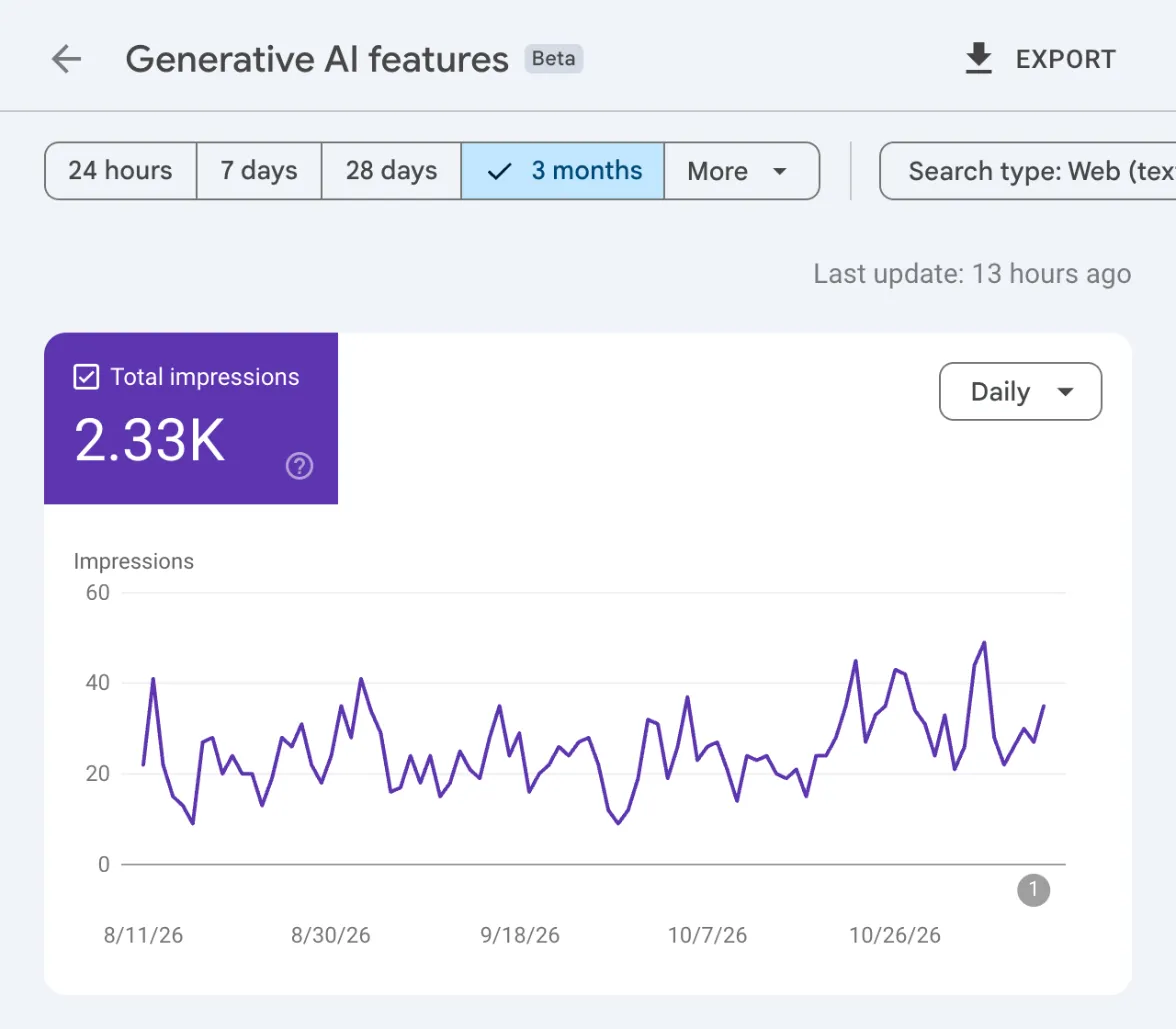
We opened seogidi.com’s report on 12 November 2026 and looked at the three months ending 10 November. A few things stood out, and they apply well beyond one site.
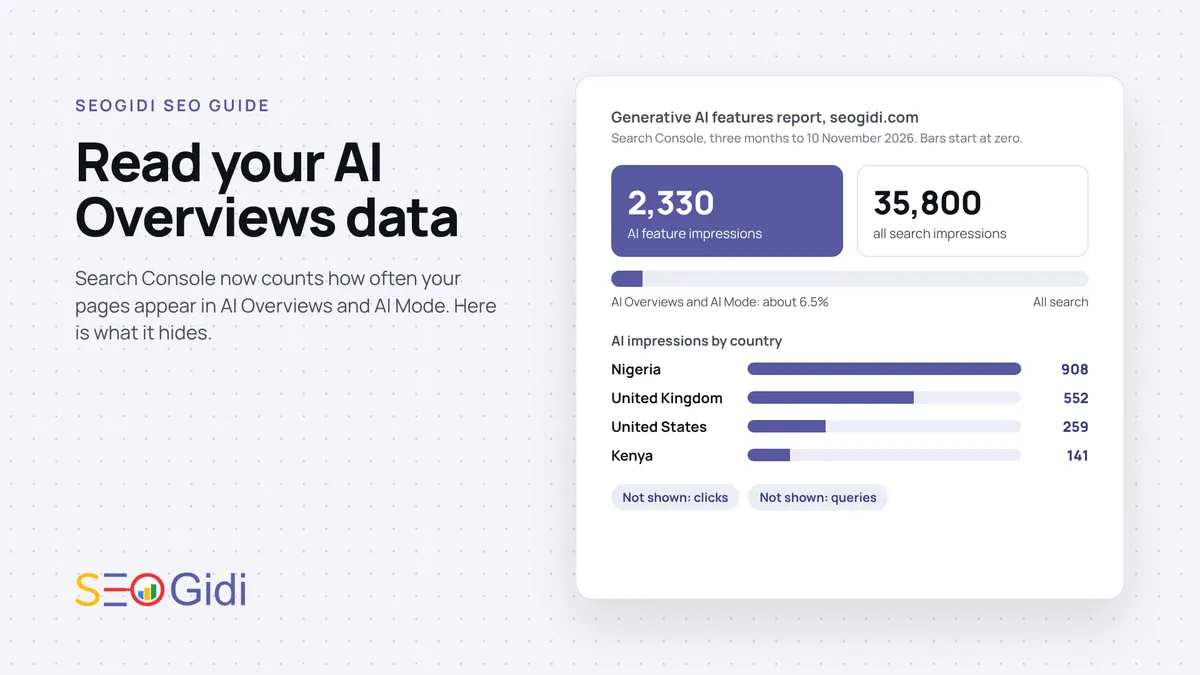
AI visibility was a small slice of search visibility. 2,330 AI impressions against 35,800 total impressions is about 6.5%. For a site whose audience is mostly Nigerian businesses, that is the honest scale of AI Overviews today. It may be very different for yours, which is the point of checking.
One page did half the work. The homepage collected 1,190 of the 2,330 impressions, about 51%. The next page, a guide to SEO for beauty salons in the UK, had 342. Then came a guide on what to do when rankings drop at 100, and service pages such as SEO for healthcare at 60. In total, 75 different URLs appeared at least once.
Nigeria led, but not by as much as organic search would suggest.
| Country | AI feature impressions |
|---|---|
| Nigeria | 908 |
| United Kingdom | 552 |
| United States | 259 |
| Kenya | 141 |
| India | 120 |
Nigeria accounted for about 39% of AI impressions. The UK showed up strongly because an old UK-focused guide gets cited there. If you sell only in Lagos, a large share of AI impressions from abroad is a sign your most-cited content is not your most commercial content.
The trend line moved with publishing. Daily AI impressions stayed mostly between 10 and 40 from August to October, then rose toward the 40s in late October and early November, after the site was rebuilt and new pages went live. One site is not evidence of a rule, so read your own line against your own publishing dates.
The new control: include or exclude your site
The same rollout added a setting. In Search Console, go to Settings, then Search generative AI under “AI controls.” The control’s help page describes three options: include your site (the default), exclude it, or inherit the setting from a parent property.
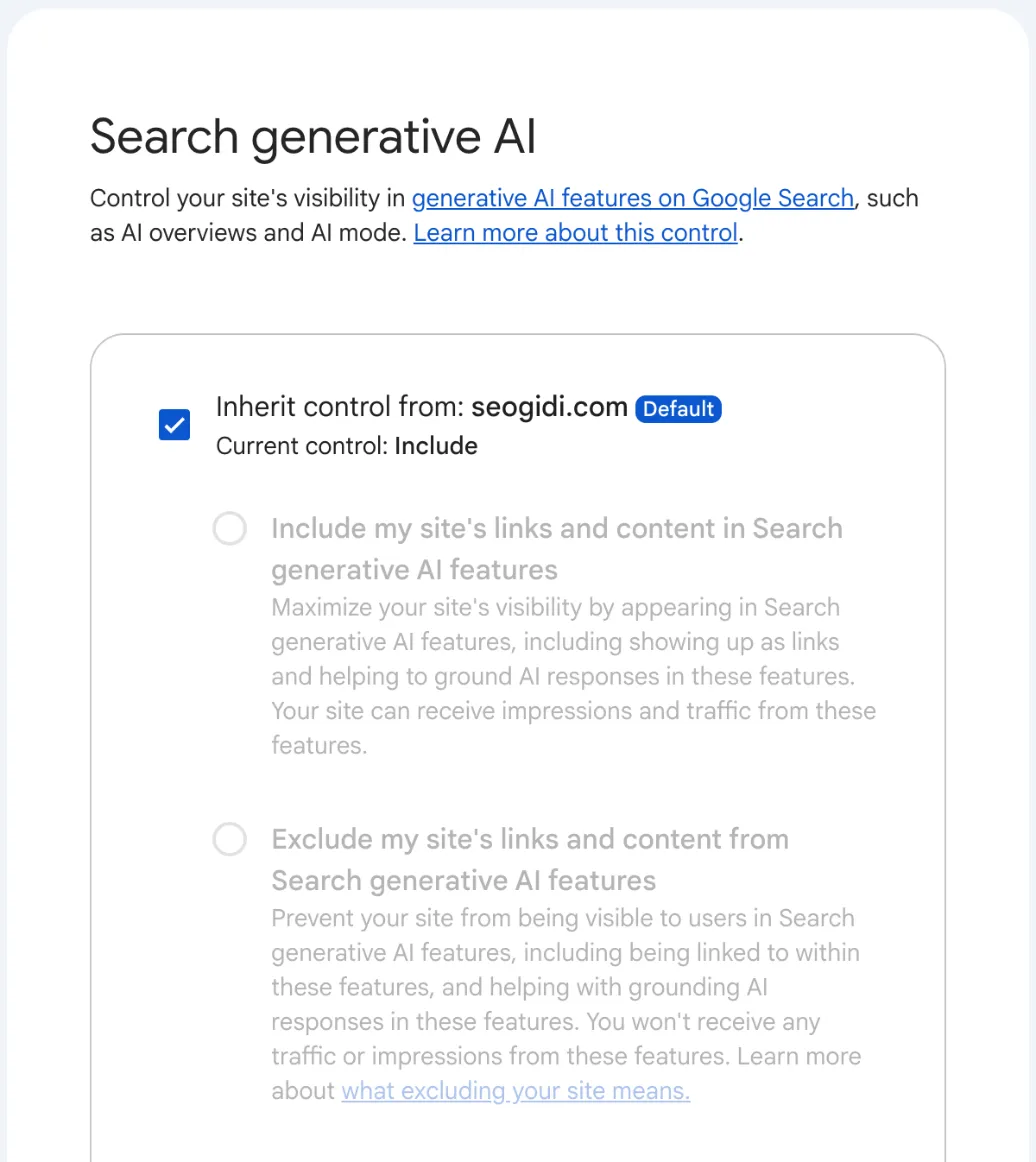
Choosing exclude means your links will not appear in AI Overviews, AI Mode or Discover’s AI features, and your content will not be used to ground those answers. Google says that sites that opt out “will not receive traffic or impressions” from these features, and that the control is not used as a ranking signal for ordinary results. The change usually takes effect within one to two days.
Two things it does not do. It does not stop AI training: for that, Google points to the separate Google-Extended setting. And it does not remove you from Google Search: that still needs noindex.
For almost every business in Nigeria, the right setting is the default. AI answers are a growing place where buyers meet a shortlist of names, and being one of those names is worth more than the clicks you might protect by hiding. The exceptions are publishers whose whole business is the click, and sites with content they do not want summarised.
How to read the report: a seven-step routine
- Set the range to three months. Daily AI numbers are small and noisy for most sites. Three months gives a line you can read.
- Work out your AI share. Divide AI impressions by total impressions from the main Performance report for the same range. Write it down each month.
- Open the Pages view and sort by impressions. Ask of each top page: is this a page I want buyers to land on? If your most-cited page is an old blog post, give it a clear path to a service page.
- Check Countries against your market. If most AI impressions come from countries you do not serve, your cited content is attracting the wrong audience. Build or strengthen pages for your real market.
- Cross-check clicks in the main report. For your top AI pages, open the main Performance report, filter to that page, and watch clicks and CTR over the same weeks. A page whose AI impressions rise while its clicks fall may be answered in the overview without a visit.
- Annotate your changes. Note when you published, rewrote or restructured key pages. The AI line responds to content, and you will want to know what moved it.
- Track your traffic from AI separately. Search Console cannot separate AI clicks yet, but your analytics can show visits referred by ChatGPT, Perplexity, Gemini and others. Set that up the way we described in our piece on ChatGPT’s own search console.
How to earn more AI visibility on Google
The report tells you where you stand. Getting cited more often comes down to the same work that wins ordinary search, done with AI answers in mind:
- Answer the question in the first two sentences of the page. AI Overviews pull short, direct statements. A page that opens with the answer gives the model something to quote.
- Put numbers next to their sources. A clear sentence with a figure and a named source is easy to cite. Vague claims are not.
- Keep facts consistent everywhere. Your prices, address, opening hours and services should match across your site, your Google Business Profile and directories.
- Earn mentions, not just links. AI systems lean on what other sites say about you. Original data and research get mentioned.
We cover this in more depth in our guide to GEO and AEO for Nigerian businesses and on our generative engine optimisation page. If you are worried about lost clicks rather than visibility, our earlier piece on whether AI Overviews reduce traffic sets out what the research says.
Frequently asked questions
Where do I find the generative AI report in Search Console?
Open the Performance report for Search results. Below the chart there is a notice about your site’s performance in generative AI features, with an “Open report” link. Google may not show the report if your site has had too few impressions in AI features.
Does the Search Console AI report show clicks from AI Overviews?
No. It shows impressions only. Clicks from AI Overviews and AI Mode are counted in the main Performance report, but they are combined with ordinary search clicks, so you cannot isolate them today.
Can I see which queries triggered AI Overviews for my site?
Not in this report. It breaks impressions down by page, country, device and date, but not by query. Use the main Performance report to see the queries each page ranks for, then compare with the pages that appear in AI features.
Will excluding my site from AI Overviews hurt my normal rankings?
Google says the control is not used as a ranking signal for results outside its generative AI features. Excluding removes your links and content from AI Overviews, AI Mode and Discover’s AI features, and you lose the impressions and traffic those features send.
Is the generative AI report available for every website?
Google completed the rollout worldwide on 31 August 2026. A site with very few AI impressions may still see no report, because Search Console needs enough data to display it.
If you want to know how your business shows up in Google’s AI answers and what to fix first, request a free SEO audit. It includes a check of whether ChatGPT, Gemini and Google AI Mode name your business.
Reports, articles and industry research, by email
Original Nigerian search data a few times a year, new guides as they are published, and a short note when Google or Meta changes something that affects businesses here. No sales emails, unsubscribe in one click.

Want this done for your business?
Get a free SEO audit: rankings, technical issues, competitor gaps and the quickest wins, within 48 hours.