seogidi.com
Your Nigerian customer will almost certainly meet your website on a phone. StatCounter’s October 2026 figures put mobile at 77.53% of page views in Nigeria, against 22.03% for desktop. That visitor is often on a busy cell tower, on a mid-range Android, paying for every megabyte.
So mobile SEO best practices in Nigeria come down to one discipline: build pages that show their main content in about 2.5 seconds on that phone, stay still while they load, respond when tapped, and do not eat the visitor’s data. Everything below is how to get there, in the order I would fix things on a typical small business site.
Why mobile SEO in Nigeria is a speed and data problem
Google now ranks your site based on what its smartphone crawler sees. Google completed its move to mobile-first indexing in 2024, and sites that were not accessible on mobile were expected to drop out of the index after 5 July 2024. If your mobile page is slow, broken or stripped down, that is the version Google judges.
The network itself is not the main villain. Ookla’s Speedtest Global Index put Nigeria’s median mobile download speed at 44.14 Mbps in December 2025, 85th in the world. A median hides a lot, though. Evening congestion in Surulere is not the same as a quiet morning in Maitama, and the median user is not the customer on one bar of signal in Onitsha market.
Data cost is the bigger problem. The NCC approved telecom tariff increases capped at 50% in January 2025, the first in the sector in about eleven years. By TechCabal’s calculation from telco 1GB prices, the average price per gigabyte rose from ₦287.5 in July 2023 to ₦637.5 in July 2025.
Measured across all plan sizes, Nigeria looks cheaper: Broadband.co.uk’s 2026 price league puts the average 1GB at $0.23, 37th of 234 countries, with prices collected in July 2026. The gap tells you something useful. Big bundles are cheap per gigabyte. Small top-ups are not, and many people manage data in small top-ups.
The 3-second rule, and why it still holds
The “3-second rule” comes from Google research published in 2016: 53% of mobile visitors leave a page that does not load within three seconds. The study is ten years old and was not about Nigeria. I still use it as a gut check, because nothing about expensive data makes people more patient. The measurable version of the rule today is Core Web Vitals.
Core Web Vitals targets for 2026
Google measures three things at the 75th percentile of real page loads, split by mobile and desktop. That means 75% of your visitors must have a good experience for the page to pass, not just the ones on fast Wi-Fi.
| Metric | What it measures | Good | Needs improvement | Poor |
|---|---|---|---|---|
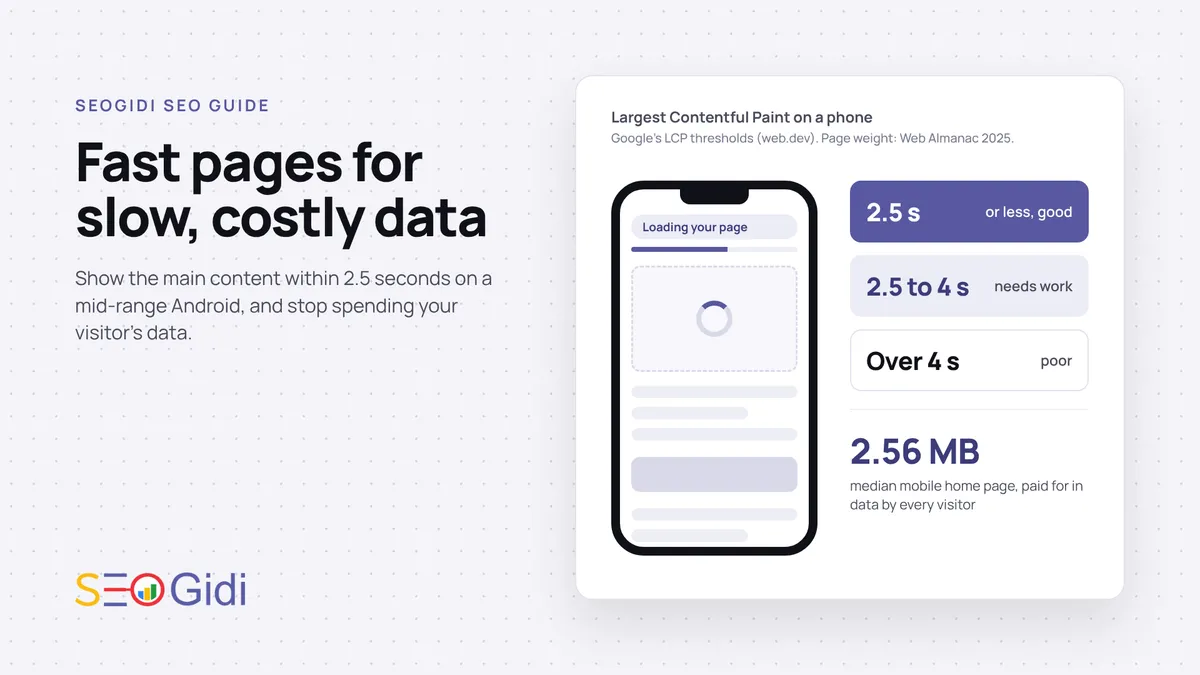
| Largest Contentful Paint (LCP) | How fast the main content appears | 2.5 seconds or less | 2.5 to 4 seconds | Over 4 seconds |
| Interaction to Next Paint (INP) | How fast the page responds to taps | 200 ms or less | 200 to 500 ms | Over 500 ms |
| Cumulative Layout Shift (CLS) | How much the layout jumps while loading | 0.1 or less | 0.1 to 0.25 | Over 0.25 |
The thresholds come from Google’s pages on LCP, INP and CLS. INP replaced First Input Delay as a Core Web Vital in 2024, so older guides that talk about FID are out of date.
How much do they matter for ranking? Google says it “highly recommend[s] site owners achieve good Core Web Vitals for success with Search” and that this aligns with what its core ranking systems reward. It does not promise a ranking boost. A fast page with weak content will still lose to a slower page that answers the query better. Speed is the floor, not the ceiling.
Set a page weight budget before anything else
The typical web page is heavy. The 2025 Web Almanac found the median mobile home page weighed 2.56 MB, with 911 KB of images and about 646 KB of JavaScript on the median mobile page.
At TechCabal’s ₦637.5 per gigabyte, a 2.56 MB page costs the visitor roughly ₦1.60 to load. That sounds small until you count a ten-page browse, plus every return visit, plus the wait on a congested tower. The cost your customer feels is mostly time.
My working budget for key landing pages on a Nigerian small business site, which is a judgement call and not a Google rule:
- Total page weight under 1 MB on first load.
- Images above the fold under 200 KB combined.
- JavaScript under 300 KB, and less if you can.
- No more than two web font files.
You will not hit this on every page. A budget still forces the useful question each time someone wants to add a slider, a chat widget or a third tracking pixel: what does it cost the visitor?
Images: WebP, AVIF and the right size
Images are usually the quickest win. A product photo straight from a phone can run to several megabytes, displayed in a box 400 pixels wide.
Fix size first. Resize images to the largest size they actually display at, and use srcset so small screens get small files. Then fix format:
- WebP: Google says WebP lossy images are 25 to 34% smaller than comparable JPEGs, and lossless WebP is 26% smaller than PNG.
- AVIF: often smaller again at the same visual quality. It has been supported in Chrome since 2020, Firefox since 2021 and Safari since 2022.
Use a <picture> element that offers AVIF, then WebP, then JPEG as a fallback, so older browsers still get an image. On WordPress, most image optimisation plugins can do this for you. Check the output, not the settings page.
Lazy loading, done right
Add loading="lazy" to images and iframes below the fold. The browser then skips them until the visitor scrolls near them, which saves data for people who never scroll that far. The attribute works in Chrome, Edge, Firefox and Safari, and older browsers simply ignore it.
The common mistake is lazy loading everything, including the hero image. Google’s guidance is clear: do not lazy load images in the first viewport, especially the LCP image, and consider fetchpriority="high" on that hero image instead. Lazy loading the wrong image makes LCP worse, not better.
Fonts, scripts and Opera Mini
Fonts quietly add weight and delay text. Google’s font best practices cover the main moves:
- Use WOFF2 only. It compresses about 30% better than WOFF.
- Subset fonts to the characters you need.
- Use
font-display: swapso text shows immediately in a fallback font. - For body text, consider
system-uiand download no font at all.
JavaScript is the harder conversation, because every plugin has a champion. Floating WhatsApp buttons, review carousels, pop-ups and several analytics tags each add a script, and on a mid-range phone those scripts are what push INP into the red. Audit them twice a year and remove what nobody uses.
Also remember who is browsing. In KPMG and Orange’s Nigeria smartphone study, covering 12 cities, Opera Mini had a 49% presence on smartphones, second only to Chrome. Pages whose core content, prices and links work as plain server-rendered HTML hold up across every browser. Pages that need a heavy JavaScript app to show a price do not.
Host close to your users
Every request has to travel to your server and back. If your server sits in the United States or Europe, each round trip adds delay before the first byte arrives, and a page makes many round trips.
Options have improved. AWS has a Local Zone in Lagos, and several large CDNs serve from African locations. For a small business site, the practical version is simpler: put a CDN in front of your site, cache pages that do not change per visitor, and check Time to First Byte from Nigeria, not from your developer’s laptop in another country.
Cheap shared hosting is often the real bottleneck. If your server takes over a second to respond, no amount of image compression will save your LCP.
How to test under real Nigerian conditions
Lab tools on a fast office connection will flatter you. Here is the routine I recommend:
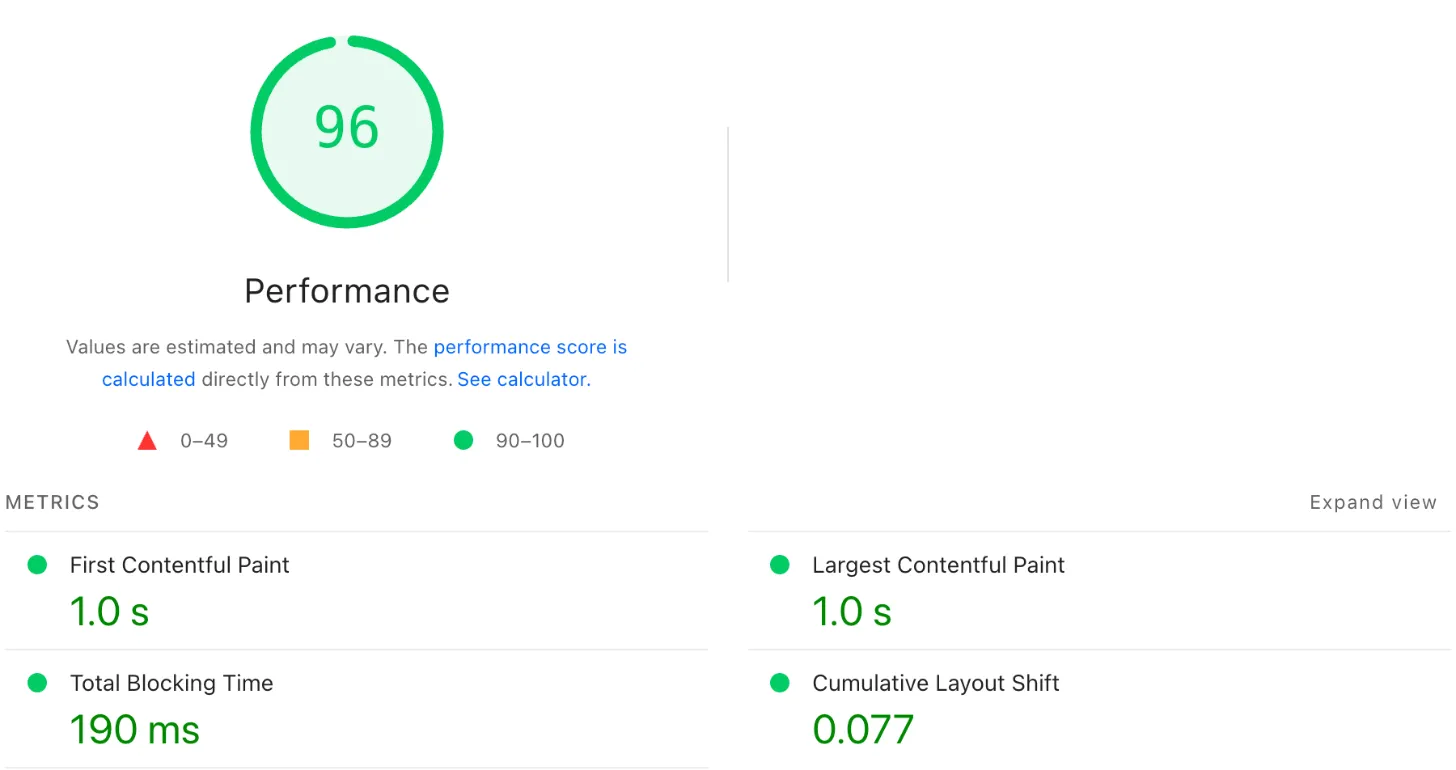
- Start with field data. Open the Core Web Vitals report in Google Search Console. It shows how real visitors experienced your pages, grouped into good, needs improvement and poor.
- Check single pages in PageSpeed Insights. Look at the field data at the top first, then the lab suggestions below it.
- Throttle Chrome DevTools. In DevTools settings, add a custom network profile with slower download speed and higher latency, and use the CPU calibration to approximate low and mid-tier phones.
- Watch the Network panel. Reload with the cache disabled and read the total transferred at the bottom. That number is what your visitor pays for.
- Test on a real phone. Use a mid-range Android on MTN, Airtel or Glo, at 8pm, somewhere busy. Note how long before you can read the price and tap the button.
- Fix one thing, then measure again. Change images first, then scripts, then hosting, so you know what worked.
Where to start: a quick priority table
| Symptom | Likely cause | First fix | Effort |
|---|---|---|---|
| Slow LCP, large page weight | Oversized hero or product images | Resize, convert to WebP or AVIF, preload hero | Low |
| Slow LCP, small page weight | Slow server or no caching | CDN, page caching, better hosting | Medium |
| Poor INP | Too many scripts and plugins | Remove unused scripts, defer the rest | Medium |
| Poor CLS | Images and ads without set dimensions, late fonts | Set width and height, reserve ad space, font-display: swap |
Low |
| Fine in tests, slow for customers | Testing on fast Wi-Fi only | Throttled and real-device testing | Low |
Speed is part of the whole page, not a separate project
A fast page still needs to answer the search. The customer who taps through from “generator repair near me” in Ikeja wants your price, your area and a way to call. Speed gets them to that information before they give up. Your local SEO and content get them to the page in the first place.
If you sell online, every extra second sits between the product page and the cart, which is why speed is one of the first things worth checking in SEO for ecommerce. And if your site is built on a heavy theme you cannot fix, sometimes a rebuild costs less than months of patching. Our website design in Nigeria service builds light pages from the start for that reason.
For the bigger picture of how Nigerians search, including mobile share and browser habits, see SEOGidi’s State of Search in Nigeria 2026. And if your rankings slipped after a redesign that added weight, this guide on ranking drops covers how to find the cause.
Frequently asked questions
Does page speed affect SEO rankings in Nigeria?
Yes, but as one signal among many. Google recommends good Core Web Vitals and says page experience aligns with what its ranking systems reward, but relevance and content quality still decide most rankings. Speed matters more in Nigeria for a second reason: slow pages lose visitors before they convert.
What is a good Core Web Vitals score?
A page passes when, at the 75th percentile of real visits, LCP is 2.5 seconds or less, INP is 200 milliseconds or less and CLS is 0.1 or less. Google checks mobile and desktop separately. For most Nigerian sites, the mobile result is the one to watch.
How do I check my website speed for users in Nigeria?
Use the Core Web Vitals report in Google Search Console for real-user data, and PageSpeed Insights for individual pages. Then test on a mid-range Android phone on a Nigerian network at a busy time of day. Lab tests on fast Wi-Fi alone will make your site look better than it is.
Should I use WebP or AVIF images?
Use both through a <picture> element, with JPEG as a fallback. AVIF is often the smallest, and WebP is a safe, widely supported middle option. The bigger saving usually comes from resizing images to their display size first.
How long before speed improvements show in Google?
Field data in Search Console reflects real visits over time, so improvements appear gradually rather than overnight. Any ranking effect is not guaranteed and depends on your content and competition. Conversions from faster pages often show up sooner than ranking changes.
If you want to know where your own site loses time and data, start with a free SEO audit.
Reports, articles and industry research, by email
Original Nigerian search data a few times a year, new guides as they are published, and a short note when Google or Meta changes something that affects businesses here. No sales emails, unsubscribe in one click.

Want this done for your business?
Get a free SEO audit: rankings, technical issues, competitor gaps and the quickest wins, within 48 hours.