seogidi.com
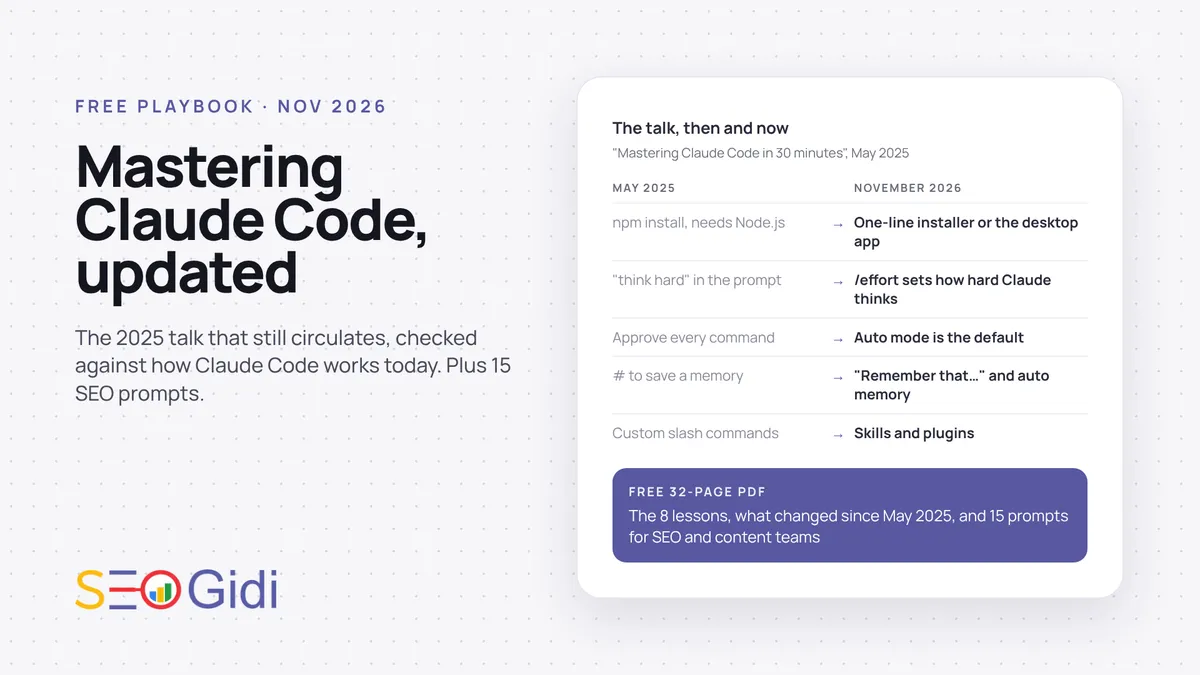
If a clip of Boris Cherny explaining how to use Claude Code has landed in your feed this week, you are watching a talk from May 2025. “Mastering Claude Code in 30 minutes” was recorded at Anthropic’s Code with Claude event, 18 months ago. The advice is still good. Many of the commands, shortcuts and settings in it have changed.
We went through the talk line by line, checked every point against Anthropic’s Claude Code documentation on 25 November 2026, and turned it into a free 32-page playbook. You can get the PDF here with your name and email, or join the SEOGidi community on WhatsApp to get guides like this free whenever we publish them.
What still holds from the talk
Boris built Claude Code, and the habits he described are the ones Anthropic still recommends.
- Ask questions before asking for changes. At Anthropic, new engineers start by asking Claude Code about the codebase. He said that cut onboarding from two or three weeks to two or three days.
- Ask for a plan before a big task. “The easiest way to get the result you want is ask it to think first.”
- Give Claude a way to check its work. A test, a script or a screenshot lets it compare its output against a target and fix its own mistakes.
- Write down what Claude cannot find on its own in a CLAUDE.md file, and share your setup with your team.
What has changed since May 2025
| Topic | In the talk (May 2025) | Today (November 2026) |
|---|---|---|
| Install | npm install, needs Node.js | One-line installer, Homebrew or WinGet, or the desktop app |
| Thinking harder | “think hard” in the prompt | /effort sets the level. “ultrathink” still works for one turn |
| Planning | Ask for a plan in the prompt | Plan mode blocks edits until you approve (Shift+Tab or /plan) |
| Approvals | Approve each command | Auto mode is the default in the terminal and VS Code |
| Memory | The # shortcut | Say “remember that…”, or use /memory. Auto memory saves notes itself |
| Saved prompts | Custom slash commands | Skills, shared through plugins |
| Checking work | Tests and screenshots | Plus /goal, /verify and /code-review |
A few of these deserve a closer look.
Auto mode is now the default. In the talk, you approved commands one by one or added them to an allow-list. Since Claude Code v2.1.283, interactive sessions in the terminal and VS Code start in auto mode, where a separate safety model approves routine steps and blocks risky ones, according to Anthropic’s permission modes documentation. Anthropic says it is not a guarantee, so anything that must never happen still belongs in a deny rule or a hook.
“Think hard” is now ordinary text. The model configuration docs say phrases like “think hard” are no longer recognised as keywords. The /effort command sets how hard Claude thinks, from low to max. The word “ultrathink” still asks for deeper reasoning on a single turn.
The # memory shortcut is gone. You now tell Claude to “remember that…” and it saves the note to auto memory, or you ask it to add a line to CLAUDE.md. Anthropic’s memory documentation recommends keeping each CLAUDE.md under 200 lines.
It runs in more places. In 2025 Claude Code was a terminal tool. It now also runs in the Claude desktop app, VS Code and JetBrains, on the web, on mobile, and in Slack and GitHub. If you have never used a terminal, the desktop app’s Code tab is the easiest place to start.
It needs a paid plan. On 25 November 2026, Claude’s pricing page listed Pro at $20 a month ($17 billed yearly), Max at $100 and Ultra at $200. Claude Code is not included in the Free plan.
Advice from 2025 you can drop
Some tips that spread with the video now work against you:
- Writing IMPORTANT or ALL CAPS in instructions. Current models follow plain wording, and shouting tends to make Claude over-apply a rule.
- Telling Claude to “keep going” or “loop until done”. It finishes agreed tasks without being told. Give it a check to pass instead.
- Describing your folder layout in CLAUDE.md. Claude reads the files itself. Only write down what is not in them.
Why this matters for SEO and content teams
The talk was aimed at developers, but Claude Code works on any folder of files. We use it on website source files, Search Console and crawler exports, blog drafts and server logs. Here is one of the 15 prompts in the playbook:
@gsc-this-quarter.csv and @gsc-last-quarter.csv are Search Console exports. Find the 20 pages with the biggest click loss. For each, show the change in clicks, impressions, CTR and position, and your best guess at why. Double-check the maths by recalculating totals another way.
It follows the talk’s own lessons: a clear goal, real files, and a check Claude has to pass. Claude can still be confidently wrong about numbers and about what Google does, so spot-check the output against the source file before you act on it.
Get the updated playbook
The Claude Code Prompting Playbook is free. It covers:
- Claude Code in plain English, with a 10-minute setup
- The 8 lessons from the talk, each with what changed and a prompt to try
- Everything that changed between May 2025 and November 2026, including the keyboard shortcuts
- Eight prompting principles for today’s Claude, with before-and-after examples
- 15 copy-and-paste prompts for SEO and content teams
- Safety and cost habits, a 30-day plan and a one-page cheat sheet
Get the free PDF. Enter your name and email and your download link arrives in your inbox within a minute.
Prefer WhatsApp? Join the SEOGidi community and you will get playbooks like this one free, plus updates when Claude Code changes again.
Frequently asked questions
Is the “Mastering Claude Code in 30 minutes” video still worth watching?
Yes, for the thinking behind it. Watch it alongside an updated guide, because the install steps, approval flow, memory shortcut and the way you make Claude think harder have all changed since May 2025.
Who is Boris Cherny?
Boris Cherny is the engineer who created Claude Code at Anthropic. His 2025 talk is the source of most Claude Code tips shared on LinkedIn and YouTube.
Can I use Claude Code if I am not a developer?
Yes. The Claude desktop app has a Code tab that needs no terminal. Point it at a folder of files, such as Search Console exports or blog drafts, and describe the outcome you want.
Is SEOGidi affiliated with Anthropic?
No. SEOGidi is an independent SEO agency. Claude and Claude Code are trademarks of Anthropic, PBC.
Reports, articles and industry research, by email
Original Nigerian search data a few times a year, new guides as they are published, and a short note when Google or Meta changes something that affects businesses here. No sales emails, unsubscribe in one click.

Want this done for your business?
Get a free SEO audit: rankings, technical issues, competitor gaps and the quickest wins, within 48 hours.