seogidi.com
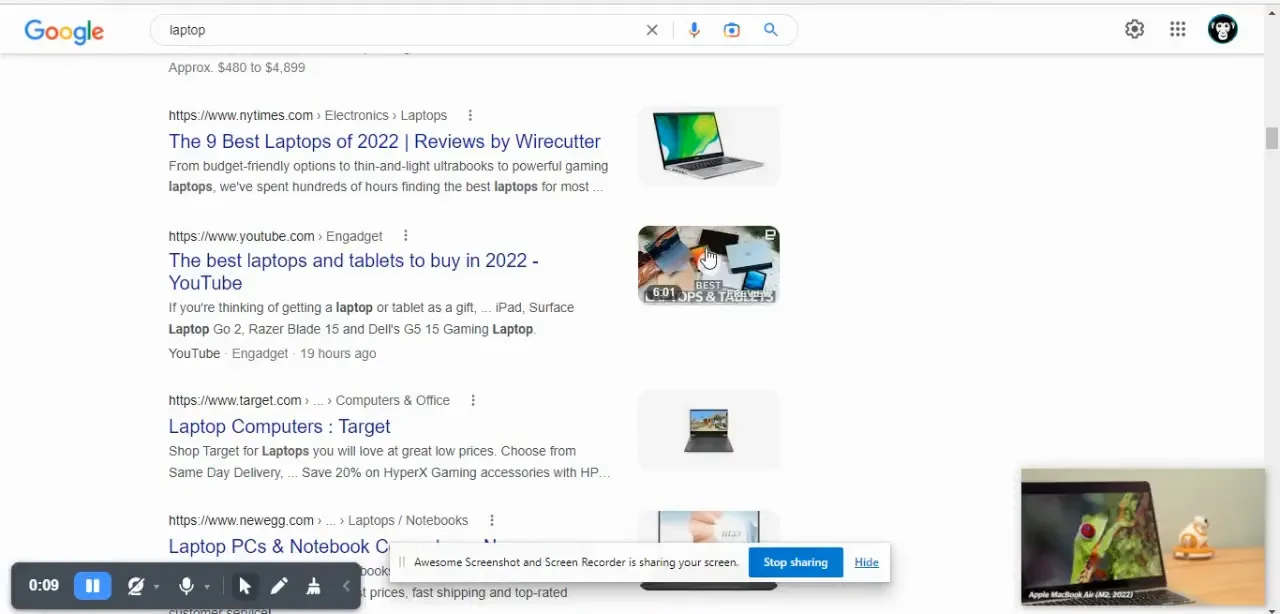
In November 2022, Google was spotted testing a picture-in-picture (PiP) player for videos in its search results. You clicked a video preview and the video kept playing in a small window at the bottom right of the results page while you scrolled on. It was a test. As of November 2026 we have found no Google announcement that it launched for everyone, so treat it as an experiment that came and went.
The more useful story is what Google did with video in Search after that test. Since 2023 it has tightened which pages can show a video result at all, and it has retired some of the video rich results it once promoted. If you publish video and want it found on Google, those changes matter far more than a floating player.
What Google tested in November 2022
Khushal Bherwani, an SEO analyst, spotted the feature and posted a screen recording of it on X (then Twitter). Search Engine Roundtable reported the test on 17 November 2022, describing a preview that, once clicked, played the video in the bottom right corner of the results page. Barry Schwartz, who wrote the report, said he could not reproduce it himself, which is typical of small Google interface tests.
Google made no public statement about the test, and the report did not say which devices showed it.
Why Google would want video to play on the results page
Our read in 2022 still holds. A player that stays on the results page keeps the searcher on Google for longer. They can watch the clip and click an ad or another result without ever landing on the site that made the video.
For publishers, that is the trade-off with every on-page feature Google tests. Visibility can go up while visits to your own site go down. We see the same pattern today with AI Overviews and AI Mode, which we cover in what Google’s AI Overviews mean for your traffic.
What has changed for video in Google Search since 2022
Video results now point only to pages where video is the main content
This is the change that hit most sites. In April 2023 Google stopped showing video thumbnails next to ordinary results unless the video was the main content of the page. By late November and early December 2023 it applied the same rule to the Videos tab (video mode). Search Engine Roundtable noted Google’s own data anomaly note, dated 30 November 2023: “only videos that are the main content of the page are eligible for indexing.”
Google’s own line, reported by Search Engine Land, was that “clicking a result in Video mode will only take users to a page where the video is the main content.” Blog posts with an embedded video, product pages with a supporting clip and category pages listing several videos stopped qualifying. Search Console started labelling many of them “Video is not the main content of the page”.
Google rewrote its video guidance in 2024
On 23 August 2024, Google overhauled its video SEO documentation and, in its words, “clarified the video indexing criteria and technical requirements” (Google Search Central documentation updates). The current video SEO best practices say a video can appear in standard results, video mode, Google Images and Discover, but only if it sits on an indexed “watch page” whose main purpose is that one video.
Blocking the video file can cost you rankings
In June 2025 Google revised its SafeSearch guidance and warned that sites blocking Googlebot from fetching their video files “may experience a significant drop in ranking, especially in Video mode” (Google Search Central documentation updates). If your developer blocked video files in robots.txt to save bandwidth, check it.
Some video rich results were retired
Google added learning video rich results in late 2023 and then retired them in 2025, along with several other structured data features. We explain what happened in our post on Google’s learning video structured data.
Where your video can appear, and what each spot needs
| Where it shows | What Google requires |
|---|---|
| Video thumbnail in standard results | An indexed watch page where the video is the main content |
| Video mode (the Videos tab) | The same watch page rule, applied since late 2023 |
| Google Images and Discover | Listed by Google as places video can appear, subject to the same indexing criteria |
| Key moments (chapters) | Detected automatically, or set with Clip or SeekToAction markup, or timestamps in a YouTube description |
The requirements in the right-hand column come from Google’s video SEO best practices. Google also says the watch page “must be performing well in Search before its video can be considered for indexing,” so a weak page will hold back even a good video.
What to do with your videos in 2026
Most sites we audit do not have a video problem. They have a page problem. The video sits halfway down a 2,000-word blog post, so Google sees an article, not a watch page.
Here is the order we work in:
- Decide which videos deserve their own page. A Lekki estate agent with a walk-through of each property, or an Ibadan cooking school with a lesson per dish, should give each video its own URL with the player at the top and a short description underneath.
- Keep the blog post as well, if it is useful. Embed the video in the article for readers, but do not expect that article to earn a video result. The watch page does that job.
- Add VideoObject structured data with a unique name, description and thumbnail for each video. Google asks that these values match what is on the page.
- Submit a video sitemap if you host your own files, with the watch page URL in the
<loc>tag. - Use a stable thumbnail URL and a video file Googlebot can fetch. Google does not support data URLs for video files.
- Mark key moments. If you host on YouTube, timestamps in the description are enough. On your own player, use Clip markup with start and end times.
- Check the Video indexing report in Search Console once a month. The reasons it gives for unindexed videos are specific and usually fixable.
If short-form video is where your audience is, the search rules on TikTok are different again. Our guide to TikTok SEO covers that side. For property businesses, video watch pages fit naturally into SEO for real estate.
Frequently asked questions
Is picture-in-picture video live in Google Search?
We could not find any Google announcement that the 2022 picture-in-picture test became a standard feature. Google runs many small interface tests that never launch widely, and this one appears to be among them. If you see it, treat it as a test.
Why is my video not showing in Google Search?
The most common reason since 2023 is that the video is not the main content of its page. Check the Video indexing report in Search Console. If it says “Video is not the main content of the page”, give the video its own watch page.
Does embedding a YouTube video in a blog post help it rank?
It can help readers and keep them on the page, but the blog post will rarely earn a video thumbnail in Google. The YouTube watch page itself can still appear in video results, which is why many businesses publish on YouTube and embed on their site.
Do I need structured data for my videos?
It is not strictly required, since Google can find videos without it. VideoObject markup and a video sitemap make it easier for Google to understand the video, pick the right thumbnail and show key moments.
If you want to know whether your own videos are indexed and why some are not, our free SEO audit checks the Video indexing report as part of the review.
Sources
- Google Tests Picture In Picture For Videos In Search Results, Search Engine Roundtable
- Google: Video is not the main content of the page, Search Engine Roundtable
- Google expands video requirements for Video mode, Search Engine Land
- Video SEO best practices, Google Search Central
- Latest Google Search documentation updates, Google Search Central
Reports, articles and industry research, by email
Original Nigerian search data a few times a year, new guides as they are published, and a short note when Google or Meta changes something that affects businesses here. No sales emails, unsubscribe in one click.

Want this done for your business?
Get a free SEO audit: rankings, technical issues, competitor gaps and the quickest wins, within 48 hours.